Methodenvergleich zur automatisierten Themenextraktion
2026-01-08
1 Intro to R
1.1 General information on the course
Dear students,
This tutorial accompanies my seminar “Methodenvergleich zur automatisierten Themenextraktion aus großen Textkorpora – Von Topic Modelling bis LLM-Annotation” at the Hochschule für Musik, Theater und Medien Hannover (HMTMH).
The course takes place every Thursday from 11:15 AM to 12:45 PM in Room 3.37.
The seminar is aimed at beginners in R who wish to explore more advanced analytical methods, such as topic modelling and other techniques for computational text analysis.
In the final part of the course, our results will be compared with GPT-based annotations to conduct a methodological comparison and reflect on the strengths and limitations of both approaches.
We will combine short theoretical introductions with practical coding sessions, allowing you to apply each concept directly in R.
Please make sure to bring your own laptop to every session so that you can work on the exercises and run the code yourself.
All materials and exercises will be made available online, so you can review the content at your own pace or catch up on missed sessions.
The tutorial can also serve as a reference guide when you start your own research projects in R (e.g., for you BA / MA thesis) and want to look up specific functions or workflows.
Best,
Lara Kobilke
1.2 What can I learn from this tutorial?
After completing the entire tutorial, you will have acquired several important skills:
- Mastery of using R and RStudio for data management, text preprocessing, and analysis.
- Understanding the principles of topic modelling, including data preparation, model fitting, and interpretation of results.
- Ability to conduct and visualize text analysis using common R packages such as tidyverse, tidytext, and stm.
- Familiarity with GPT-based annotation techniques and how to use large language models for computational content analysis.
- Competence in comparing human-coded, R-based, and GPT-based results, allowing for a critical methodological reflection.
- Understanding of the advantages and limitations of traditional and AI-supported approaches to automated topic extraction.
- And finally: developing a genuine P A S S I O N for working with R!
1.3 What can I do if I have problems with my R code?
Besides asking me during the course ( :) ) there are some great places to have a look at when you encounter problems. To give you a head start, here’s a quick rundown of the three best places to look if you have a problem with your code:
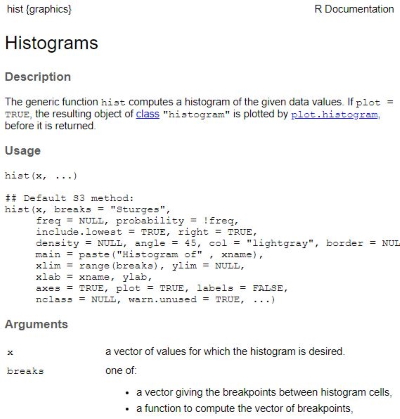
- R’s integrated help function: Use the ?-function or help()-function whenever possible. Let’s assume you struggle with creating a histogram for your data (hist()-function in R). You can open the R documentation of the hist function in R by writing:
or
| Preview of ?hist in R: |
 |
- Search engines: Like Bing or Google. Yup, those who work with R keep googling all the time! Nobody knows all the code and errors by heart. Often you can find perfect answers to your questions on Stackoverflow, StatsExchange, or Rseek because other people had exactly the same problems. And more importantly, the communities on these websites are very friendly and helpful.
- Packages’ reference manuals: Finally, problems with R packages (we’ll get to packages later, see: Packages) can often be solved by looking at their reference manuals (an overview document containing all of a package’s functions). For example, you can learn more about dplyr (a data management package that we are going to use later in this tutorial) by visiting its reference manual on “CRAN” (Comprehensive R Archive Network), which is R’s main repository: https://cran.r-project.org/web/packages/dplyr/dplyr.pdf.
That’s everything there is. I hope you find my class and this tutorial to be a valuable resource on your journey with R. I did not take the easy road to learning R, so I am really looking forward to show you the quick way! I’ve tested (a variation of) this tutorial on 4 classes of BA and MA students in Zurich and Munich before, so don’t be afraid: You got this!
Let’s now begin with our first tutorial: Tutorial: Installing & Understanding R/R Studio